












Introduction
Did you know that while the average enterprise uses nearly 900 distinct software applications, over 71% of them remain completely unintegrated?
In today’s hyper-connected business environment, this lack of connectivity is more than just an inconvenience—it is a critical operational liability. When systems operate in isolated silos, organizations face fragmented customer profiles, manual data entry errors, bloated administrative overhead, and millions of dollars lost annually in operational drag.
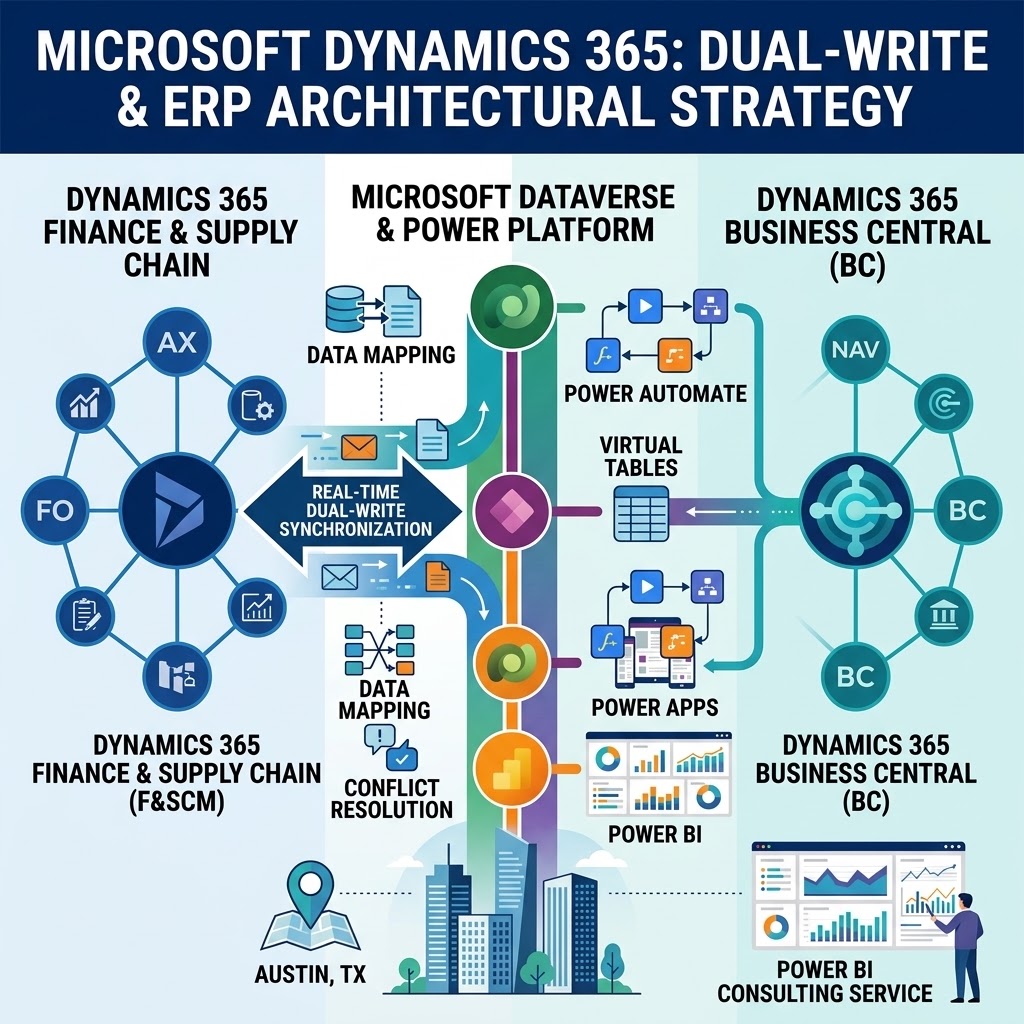
At the center of modern digital transformation sits Microsoft Dynamics 365. As a comprehensive ecosystem for enterprise resource planning (ERP) and customer relationship management (CRM), Dynamics 365 possesses the capacity to streamline sales pipelines, automate financial accounting, and elevate customer service operations. However, the true potential of Dynamics 365 is only unlocked when it seamlessly communicates with the rest of your technology stack—from third-party e-commerce platforms and custom SaaS backends to legacy databases and field operation tools.
As an organization grows, simple point-to-point connections, manual CSV imports, and rigid legacy scripts inevitably break down under the weight of increasing data volumes. To maintain peak system performance and business agility, enterprise leaders must move past rudimentary syncing mechanisms. This guide explores how to master Dynamics 365 integration to build a resilient, scalable, and high-performance digital architecture.
1. Understanding the Need for Dynamics 365 CRM Scalability
Growth is a double-edged sword for enterprise IT architecture. As your company expands, user counts rise, transaction frequencies multiply, and external applications generate an unrelenting stream of API calls into your core environment. Without an architectural foundation designed to absorb this traffic, performance degradation is inevitable.
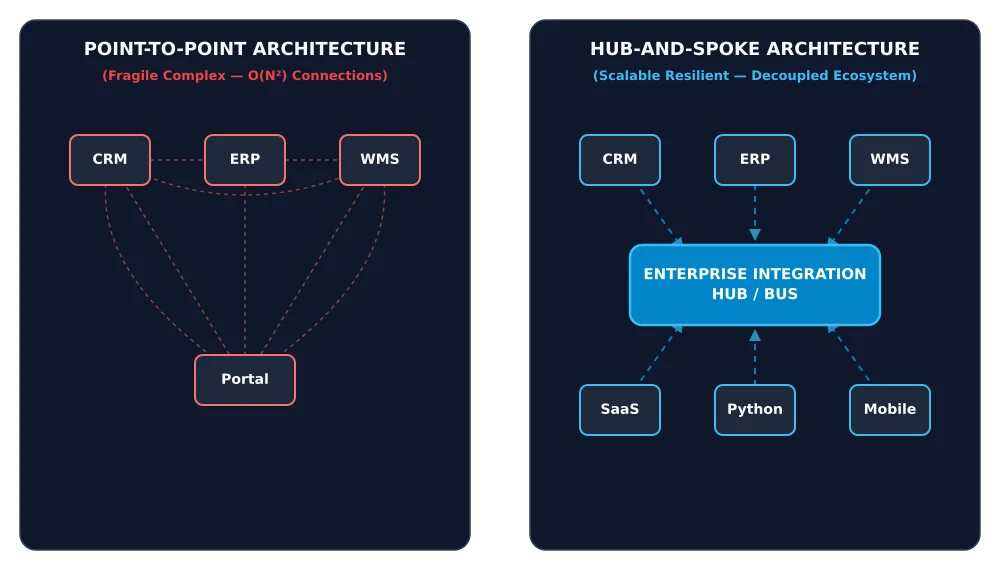
Point-to-Point vs. Enterprise Integration Frameworks
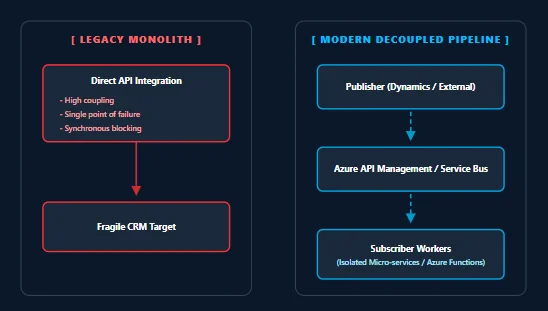
In the early stages of system adoption, point-to-point integrations seem attractive. Connecting Dynamics 365 directly to an email marketing platform or a billing engine via a basic Webhook or cron job requires minimal upfront development. However, as the number of connected systems ($N$) grows, the number of required point-to-point connections grows quadratically:
A tech stack with 10 systems requires 45 individual integrations. Under this model:
-
A change in one system’s API schema breaks multiple downstream connections.
-
Error logging is decentralized, making troubleshooting a nightmare.
-
Rate limits on the central CRM are quickly exhausted, leading to system lockouts and failed transactions.
Identifying Legacy Middleware Bottlenecks
Legacy middleware solutions often rely on scheduled batch synchronization. For example, updating inventory levels or customer lead scores once every hour. In modern operations, hourly updates are far too slow. Furthermore, legacy middleware often lacks intelligent rate-limit handling, sending monolithic payloads that trigger Microsoft Dataverse service protection limits.
Achieving Zero-Latency User Experiences
Achieving true Dynamics 365 CRM scalability means ensuring that as backend data transfer volume increases exponentially, the front-end user experience remains lightning-fast. Sales representatives in the field cannot afford to wait 15 seconds for a customer record to load while a background integration pipeline hogging API threads completes its sync. Designing for scalability isolates background sync processes from active user UI sessions.
Strategic Value: Partnering with a specialized Microsoft power platform consultancy allows organizations to audit existing architectural bottlenecks, calculate peak API load thresholds, and design a modern hub-and-spoke integration strategy that safeguards core CRM performance.
2. Dynamics 365 Integration Best Practices
Building a scalable integration environment requires strict adherence to core engineering principles. Bypassing these practices introduces technical debt that manifests as data corruption, silent sync failures, and severe operational downtime.
Shift from Batch Processing to Event-Driven Architecture
Batch jobs are inherently inefficient; they query systems for updates regardless of whether any data has changed, wasting bandwidth and API quotas. Scalable systems utilize an event-driven architecture (EDA):
-
Webhooks: Dynamics 365 publish/subscribe webhooks fire immediately when a specific data event occurs (e.g.,
Account CreatedorInvoice Paid). -
Message Brokers: Events are published to a central message bus (such as Azure Service Bus), allowing downstream applications to consume data at their own pace without burdening the source system.
Manage API Throttling and Service Protection Limits
Microsoft Dataverse enforces strict Service Protection Limits to ensure system availability. These limits evaluate requests based on three metrics over a 5-minute window:
-
Number of requests.
-
Combined execution time.
-
Number of concurrent threads.
To adhere to Dynamics 365 integration best practices, integrations must implement exponential backoff with jitter. When Dynamics 365 returns an HTTP 429 (Too Many Requests) status code with a Retry-After header, the integration engine must immediately pause execution, wait for the specified duration plus a randomized micro-delay (jitter), and retry the payload gracefully.
Maintain Data Hygiene and Idempotency
In high-volume systems, network retries can cause duplicate requests to land in Dynamics 365. To prevent duplicate customer creation or double-billing:
-
Enforce Idempotency: Design API endpoints such that executing the same request multiple times produces the exact same result as executing it once. Use deterministic GUIDs or primary keys from external systems as alternate keys in Dataverse.
-
Leverage Native Duplicate Detection: Configure Dataverse duplicate detection rules on key attributes like email addresses, tax IDs, or external account numbers.
3. The Power of Dynamics 365 Custom Connectors
While Microsoft provides hundreds of pre-built connectors for popular services, enterprise environments frequently rely on proprietary applications, legacy internal databases, or specialized industry tools. This is where custom connectors become invaluable.
Understanding Custom Connectors
A custom connector is a wrapper around a RESTful API that allows Microsoft Power Automate, Logic Apps, and Power Apps to communicate directly with an external service. By defining the external system’s endpoints, request structures, and response schemas using an OpenAPI (Swagger) specification, non-technical developers can interact with complex external APIs using visual low-code actions and triggers.
Authentication Protocols for Enterprise Security
Security must never be sacrificed for connectivity. When building Dynamics 365 custom connectors, implement industry-standard authentication mechanisms:
-
OAuth 2.0: The gold standard for secure delegation. Supports authorization code flows and client credentials flows (ideal for server-to-server communication).
-
API Key Authentication: Suitable for lightweight microservices, passing encrypted tokens through request headers.
-
On-Premises Data Gateway: When connecting cloud-based Dynamics 365 instances to local, on-premise open-source databases, the Data Gateway creates a secure, encrypted tunnel through the firewall without opening inbound ports.
Eliminating Middleware Bloat
By building reusable custom connectors, organizations eliminate the need for costly third-party integration platform services (iPaaS) for every simple endpoint. Logic and authentication are encapsulated directly within the Microsoft environment, establishing clean, maintainable, and low-latency connections.
4. Azure and Dynamics 365 Architecture: Better Together
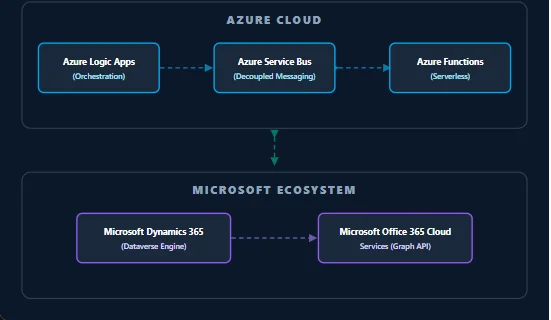
Dynamics 365 does not exist in isolation—it is an integral component of the broader Microsoft Cloud ecosystem. To achieve enterprise scale, architects must leverage the native synergies between Azure and Dynamics 365 architecture.
Orchestrating Enterprise Workflows with Azure Logic Apps
While Power Automate is optimized for user-centric, low-code automation, Azure Logic Apps is built for heavy-duty, developer-centric enterprise integration. Logic Apps provides:
-
Unlimited execution runs and advanced diagnostic logging via Azure Application Insights.
-
Out-of-the-box support for complex enterprise integration patterns (EIP), such as content-based routing, splitter-aggregator patterns, and XML/JSON transformations using Liquid templates.
Decoupling Systems with Azure Service Bus
The single most effective tool for preventing system outages during traffic spikes is Azure Service Bus. By introducing a publish-subscribe message queue between Dynamics 365 and external platforms:
-
An incoming wave of 50,000 order submissions from a web storefront is held securely in an Azure Service Bus queue.
-
A worker application or Logic App reads messages from the queue in controlled, manageable batches.
-
Dataverse processes the records without exceeding API execution time limits or experiencing thread starvation.
-
If an individual record fails, it is automatically routed to a Dead-Letter Queue (DLQ) for inspection, while the primary processing pipeline continues unaffected.
Unifying Ecosystems via Microsoft Office 365 Cloud Services
Aligning your CRM architecture with Microsoft office 365 cloud services through the Microsoft Graph API enables seamless operational flows. Automatically generate customer quote documents in OneDrive, manage team authorizations via Microsoft Entra ID (formerly Azure AD), and deliver automated notifications across Teams—all guarded by unified security policies.
5. How to Scale Dynamics 365 Integrations
Upgrading an integration environment from a mid-market setup to a global, enterprise-ready infrastructure requires a deliberate, step-by-step approach.
Step 1: Transition to Decoupled Microservices
Isolate integration points into modular microservices using serverless computing, such as Azure Functions. If your billing sync fails, it should have zero operational impact on your customer support ticketing sync. Modular architectures allow individual pipelines to be scaled, modified, or re-deployed independently.
Step 2: Implement Advanced Error Handling Patterns
Resilient systems expect failure and plan for it. Incorporate standard enterprise resiliency patterns:
-
Circuit Breaker Pattern: If an external system goes offline and returns consecutive connection errors, the circuit breaker opens, temporarily stopping outgoing requests to prevent system resource exhaustion.
-
Dead-Letter Monitoring: Automated alerts notify IT personnel when records land in dead-letter queues, complete with detailed diagnostic payload logs for rapid remediation.
Step 3: Centralize Telemetry and Monitoring
Implement centralized logging across all integration flows using tools like Azure Monitor and Application Insights. Track key performance indicators (KPIs) in real-time:
-
Average API response latencies.
-
Request success vs. error ratios.
-
Daily API quota consumption per system user.
Understanding How to scale Dynamics 365 integrations requires recognizing that scalability is a continuous architectural discipline—not a one-time configuration.
6. Handling High-Volume Data Transfers in Dynamics 365
Migrating millions of historical records or syncing massive streams of real-time transactional data requires specialized extraction, transformation, and loading (ETL) methodologies. Attempting to push large datasets through standard synchronous API endpoints will result in severe performance degradation.
| Strategy | Ideal Use Case | Key Benefits | Primary Considerations |
| Delta Loading | Ongoing transactional sync | Minimal payload size, lower network bandwidth, reduced API consumption | Requires Change Tracking to be enabled on Dataverse entities |
| Azure Data Factory (ADF) | Nightly bulk sync, historical migrations, data warehouse staging | High throughput, parallel execution, native Dataverse connectors | Requires technical configuration and Azure resource management |
| Dataverse Web API Batching | Multi-record transactional processing | Groups up to 1,000 operations into a single HTTP request | Payload sizes must stay within HTTP payload constraints |
Utilizing Delta Loading with Dataverse Change Tracking
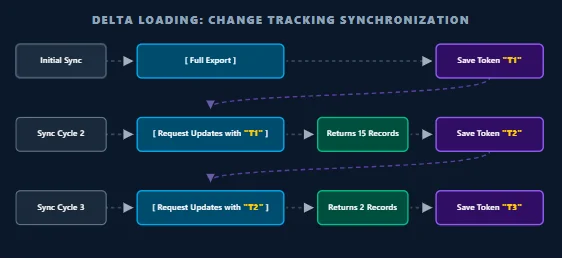
Never sync an entire table when you only need updated records. Enabling Change Tracking on Dataverse entities allows external systems to request only those records that have been created, modified, or deleted since the last execution cycle.
Initial Sync  ---> [ Full Export ] ---> Save Token "T1"
Sync Cycle 2  ---> [ Request Updates with "T1" ] ---> Returns 15 Records ---> Save Token "T2"
Sync Cycle 3  ---> [ Request Updates with "T2" ] ---> Returns 2 Records  ---> Save Token "T3"
Using a delta token (high-watermark token), downstream systems retrieve incremental updates, reducing network overhead and processing demands by up to 95%.
Executing Heavy ETL via Azure Data Factory (ADF)
When executing large data transfers, Azure Data Factory (ADF) is the ultimate enterprise tool. ADF includes native connectors for Microsoft Dataverse that optimize data throughput:
-
Parallel Copy Operations: ADF automatically partitions source data and writes to Dataverse using parallel processing streams.
-
Bulk Upsert Capabilities: Combines
InsertandUpdatecommands into unified batch requests, eliminating pre-execution lookup queries.
Mastering Handling high-volume data transfers in Dynamics 365 ensures that massive data operations execute smoothly in the background without affecting core business operations.
7. Integrating Dynamics 365 with Custom Open-Source Backends
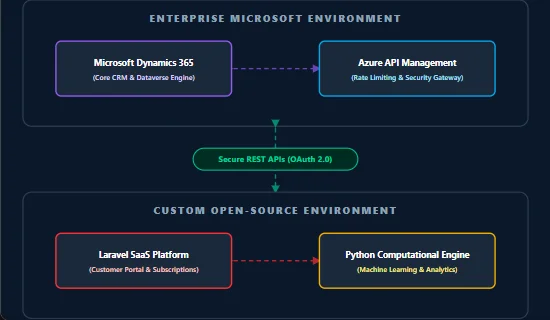
Modern enterprise IT stacks rarely rely on a single vendor. Organizations frequently deploy hybrid environments that pair Microsoft enterprise tools with specialized, custom-built open-source solutions—such as high-performance Python computational engines for machine learning, or Laravel-based web applications for customer-facing SaaS platforms.
Architecting Hybrid Data Pipelines
Connecting Microsoft products with custom open-source stacks requires building clean, decoupled interfaces.
Consider a practical enterprise workflow:
-
A user updates their subscription details on a custom Laravel-based SaaS portal.
-
Laravel emits an asynchronous HTTP POST request to an API Gateway.
-
The API Gateway routes the payload to a Python analytics microservice to calculate updated customer lifetime value (LTV) and risk scores.
-
The Python service writes the enriched data profile directly into Dynamics 365 via custom REST web services.
Technical Nuances of Open-Source Integration
When Integrating Dynamics 365 with custom open-source backends, developers must address several technical synchronization challenges:
-
Data Type Mapping: Aligning Dataverse custom choice sets (OptionSets) and lookup GUIDs with relational databases (MySQL/PostgreSQL) used in Laravel applications.
-
Asynchronous Webhook Processing: Open-source backends should implement queue workers (such as Laravel Horizon or Celery for Python) to consume incoming Dynamics 365 webhooks asynchronously, preventing connection timeouts.
-
Zero-Trust Security & API Gateways: Deploying an API Gateway (such as Azure API Management or Kong) between Microsoft and open-source applications enforces strict IP whitelisting, OAuth 2.0 token validation, and request sanitization.
8. Automating the Ecosystem with Power Automate
While high-volume data transport relies on Azure pipelines and custom APIs, business process automation requires an agile, responsive orchestrator. Microsoft Power Automate bridges the gap between technical infrastructure and everyday business operations.
Low-Code Operational Loops
Power Automate empowers organizations to build sophisticated cross-platform workflows using visual, low-code design canvases. Key operational capabilities include:
-
Automated Data Enrichment: Automatically trigger background validations when a new account is registered in Dynamics 365.
-
Instant Cross-Channel Alerts: Deliver instant Microsoft Teams or email notifications to account managers when high-priority leads enter the CRM pipeline.
-
Automated Document Generation: Convert CRM record data into polished PDF invoices or proposals and archive them automatically in secure cloud storage.
Operational Insight: Engaging specialized power automate consulting services ensures that low-code automated flows adhere to enterprise governance policies, avoiding sprawling, unmanaged flows that consume unexpected tenant operations.
Visualizing End-to-End Workflow Automation
By combining low-code automation tools with custom-coded APIs, organizations create unified operational workflows. Automating Dynamics 365 workflows with Power Automate turns manual multi-step business processes into single, error-free automated sequences.
Conclusion
As digital operations accelerate, relying on isolated applications and fragile middleware is no longer viable. Enterprise agility, customer satisfaction, and operational efficiency depend directly on building a connected digital ecosystem.
Scaling your Microsoft environment requires a clear architectural vision:
-
Transitioning from fragile point-to-point connections to decoupled, event-driven architectures.
-
Utilizing Azure Service Bus and Logic Apps to absorb high-volume data transfers gracefully.
-
Developing robust custom connectors to bridge Microsoft tools with open-source frameworks like Python and Laravel.
-
Implementing low-code automation through Power Automate to streamline daily operations.
By establishing a modern, scalable integration architecture today, your organization eliminates technical friction, protects core CRM performance, and builds a flexible digital foundation ready for future growth.