











The architectural landscape of enterprise resource planning (ERP) has undergone a radical transformation. For decades, legacy systems like Axapta (AX) and Navision (NAV) operated as rigid, monolithic structures. Customizations were deeply embedded into the core application code, making system upgrades expensive, risky, and excruciatingly slow. Today, the paradigm has shifted entirely toward a composable, cloud-native ecosystem driven by Dynamics 365 Finance & Supply Chain Management (F&SCM), Dynamics 365 Business Central (BC), and the underlying Microsoft Dataverse.
This article provides an in-depth architectural analysis of how modern Microsoft ERPs handle extensibility without compromising continuous updates. Furthermore, we will explore the intricacies of data integration across this landscape, analyzing the technical mechanics of Dual-Write and Dataverse synchronization. For Enterprise Architects, Senior Developers, and CIOs managing hybrid or complex ERP environments, mastering these architectural strategies is no longer optional—it is the foundation of a resilient enterprise data strategy.
Foundation 1: Business Central Extensibility via AL and Events
When Microsoft transitioned Navision to Dynamics 365 Business Central, it fundamentally rewrote the rules of customization. The legacy C/AL development environment, which allowed developers to directly alter core Microsoft objects, was entirely deprecated. In its place, Microsoft introduced the AL development language, fundamentally shifting Business Central to a strict, event-driven extensibility model.
The AL Language and VS Code Environment
Modern Business Central development is executed entirely within Visual Studio Code (VS Code) using the AL Extension. Developers no longer touch base code; instead, they create isolated packages that layer on top of the standard application.
- Workspace Configuration: Developers manage their projects using structured JSON files (app.json and launch.json), defining dependencies, runtime versions, and deployment targets.
- Object Extensions: Rather than modifying a standard table or page, developers create Table Extensions and Page Extensions. These objects append new fields or UI elements to the base application dynamically at runtime.
Subscribing to Core System Events
The true power of BC extensibility lies in its event-driven architecture. The core Microsoft application publishes hundreds of system and business events (triggers) during standard operational routines—such as posting a sales invoice or releasing a purchase order.
- Custom business logic is injected by writing Event Subscribers.
- When the core system fires an event, the AL compiler intercepts it, executes the custom subscriber logic in isolation, and then returns control to the base application.
- This ensures that the core application remains completely pristine and unaltered.
Per-Tenant Extensions (PTEs) vs. AppSource Apps
Architects must decide how to package and deploy these extensions based on the target audience:
- Per-Tenant Extensions (PTEs): These are custom-built extensions designed specifically for a single customer’s unique business processes. They are deployed directly to that specific tenant.
- AppSource Apps: These are highly validated, commercially packaged ISV solutions built for mass distribution across multiple tenants.
The “Extensions Do Not Break Upgrades” Principle
Because custom code is completely decoupled from standard objects, Business Central can seamlessly apply automated monthly platform updates. Before Microsoft rolls out an update, all tenant extensions are automatically validated against the new base code. If the event signatures match, the upgrade proceeds with zero downtime. This architectural shift permanently eliminates the traditional “upgrade project,” ensuring the ERP is perpetually modern.
Foundation 2: Finance & Supply Chain Extensibility via X++ Extensions
While Business Central caters to mid-market agility, Dynamics 365 Finance & Supply Chain Management (F&SCM) is engineered for heavy enterprise footprints, high transaction volumes, and complex global operations. Evolving from AX 2012, F&SCM has also abandoned its legacy customization model in favor of a robust, highly structured extension framework.
The X++ Compiled Language and Modern Extensions
F&SCM development is driven by X++, an object-oriented, compiled language heavily influenced by C# and managed within Microsoft Visual Studio.
In older versions (like AX 2012), developers used a technique called overlayering, which physically injected custom code into standard Microsoft models. This caused massive code conflicts during upgrades. Today, overlayering is strictly prohibited. F&SCM relies entirely on an Extension Model:
- Class Extensions and Chain of Command (CoC): Using the [ExtensionOf] attribute, developers can wrap standard Microsoft methods. Chain of Command allows custom logic to run before or after the standard method executes, utilizing the next keyword to invoke the base code.
- Table and Form Extensions: Similar to BC, developers can add new fields, buttons, and data sources to standard F&SCM tables and forms without altering the base XML metadata.
- Delegates: Microsoft provides specific hooks within the base code (delegates) that developers can subscribe to, allowing safe data manipulation during complex transactional posting routines.
Deployment Lifecycle: LCS and Azure DevOps
Because F&SCM supports massive enterprise architectures, its deployment lifecycle is intensely governed by Lifecycle Services (LCS) and Azure DevOps. Code is never written directly in a production environment; it must traverse a strict promotion pipeline.
- Tier 1 Environments (Dev/Test): Developers write and unit-test X++ extensions here. Code is committed to Azure DevOps source control, which triggers automated build pipelines.
- Tier 2-5 Environments (UAT/Performance): Azure DevOps generates a deployable package (Asset). This package is uploaded to LCS and applied to a Tier 2 Sandbox environment for User Acceptance Testing (UAT).
- Continuous Deployment: Once validated, LCS automates the promotion of the package to the Production environment, ensuring zero manual intervention and minimizing deployment risk.
Managing Continuous Service Updates
Microsoft pushes mandatory Service Updates to F&SCM multiple times a year. Because all custom code is encapsulated in X++ extensions, these updates do not overwrite custom logic. However, Enterprise Architects rely heavily on the Regression Suite Automation Tool (RSAT). RSAT connects to Azure DevOps test plans to automatically execute functional tests against the new Microsoft release, ensuring that custom Chain of Command logic hasn’t been logically orphaned by standard code changes.
The Data Fabric: Synchronous vs. Asynchronous Dataverse Integration
Modern ERP architecture no longer treats the ERP as a siloed database. The objective is to unify enterprise data across Customer Engagement (CRM), Finance, and Operations. The foundation of this unification is Microsoft Dataverse—a highly scalable, cloud-based data platform. However, integrating ERP data into Dataverse requires a strategic choice between synchronous and asynchronous architectures.
Asynchronous Data Synchronization
For high-volume data operations, analytical reporting, and non-time-critical processes, asynchronous integration is the architectural standard.
- Export to Azure Data Lake / Synapse Link: F&SCM and Dataverse can push massive volumes of tabular data asynchronously to Azure Data Lake or Azure Synapse Analytics. This decouples the heavy analytical processing from the transactional ERP database, preserving system performance.
- Latency: Asynchronous methods inherently involve latency (ranging from near-real-time trickle feeds to scheduled batch jobs). This is acceptable for financial reporting, but insufficient for live operational workflows.
Synchronous Data Integration
When business processes require immediate, cross-application data consistency, synchronous integration is required.
- Business Central’s Connector: BC utilizes a robust, out-of-the-box Dataverse connector. This integration relies on API-driven synchronization that maps BC tables to Dataverse entities, allowing salespeople in Dynamics 365 Sales to see BC pricing and inventory natively.
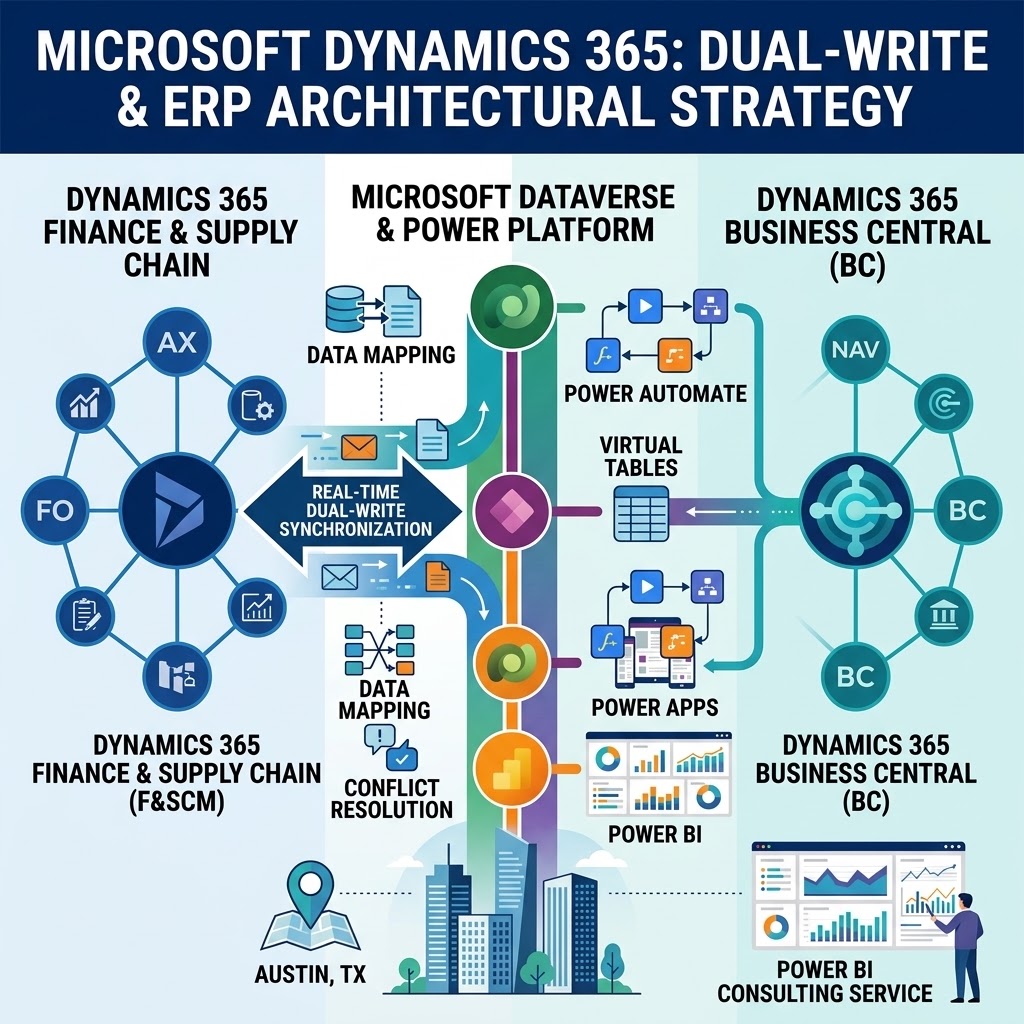
- Virtual Entities (Metadata Level): F&SCM utilizes Virtual Entities to expose ERP data within Dataverse without physically duplicating the data. Dataverse applications (like Power Apps) can read, create, and update F&SCM records in real-time via OData endpoints, but the data ultimately lives only in F&SCM.
While Virtual Entities are powerful, they do not physically replicate data across both databases. When deep, physical data replication is required instantly, the architecture demands Dual-Write.
Architectural Deep-Dive: Real-Time Bi-Directional Dual-Write
The most technically demanding integration strategy in the Dynamics 365 ecosystem is Dual-Write. Dual-write is an out-of-the-box infrastructure that provides tightly coupled, near-real-time, and bi-directional integration between F&SCM and Dataverse.
Dual-Write Mechanics
Unlike asynchronous batch jobs, Dual-Write operates synchronously at the database transaction level.
- Transaction Execution: When a user creates a record in F&SCM (e.g., a new Customer), the X++ transaction initiates. Before that transaction is fully committed to the F&SCM SQL database, a synchronous call is made to the Dataverse API.
- Bi-Directional Commit: Dataverse receives the payload, executes its own plugin pipeline, and writes the record. Only upon a successful confirmation from Dataverse does F&SCM commit the final transaction. The reverse is true when data originates in Dataverse (e.g., Dynamics 365 Sales).
- Map Setup and Initial Sync: Architects configure Dual-Write by mapping F&SCM Data Entities directly to Dataverse Tables. Before enabling live synchronization, an “Initial Sync” must be executed to align historical data across both systems, ensuring primary keys and integration IDs match perfectly.
Strategic Implementation and Regional Expertise
Implementing such a tightly coupled framework requires deep architectural foresight. For instance, our optimized architecture strategy, refined through years of Microsoft Power Platform Austin implementations, addresses complex system behaviors such as resolving payload limitations, handling bespoke Dataverse plugins, and designing resilient error-handling protocols for global deployments.
Technical Challenges & Solutions
While Dual-Write enables seamless cross-app workflows, architects must design around several complex constraints:
- Handling Integration Errors (Synchronous Blocking): Because Dual-Write is synchronous, if Dataverse is offline or rejects the payload (e.g., a required field is missing), the transaction in F&SCM will fail, rolling back the user’s action. To mitigate this, architects can configure “Catch-up” queues. If a transient error occurs, the system can temporarily pause the live sync, queue the transactions asynchronously, and retry them once connectivity is restored.
- Legal Entity Constraints (Cross-Company Mapping): F&SCM is highly segregated by “Legal Entities” (companies). Dataverse, historically, is not. Dual-Write architecture requires the implementation of a Company concept in Dataverse. Architects must meticulously map F&SCM company identifiers to Dataverse business units or custom company tables to ensure data is properly segregated and secure across global subsidiaries.
- High-Volume Optimization Constraints: Dual-Write is not designed for bulk data migration or high-volume automated integrations. Pushing 100,000 journal entries through Dual-Write will severely degrade ERP performance due to the synchronous API overhead. Architects must split workloads: use Dual-Write for master data (Customers, Vendors, Products) and critical operational documents (Sales Orders), but route high-volume telemetry, IoT data, or heavy journal imports through asynchronous Data Management Framework (DMF) APIs.
Closing the Loop: Unified Intelligence and Analytics
The ultimate goal of modernizing ERP extensibility and implementing real-time Dataverse integration is not just operational efficiency—it is data intelligence. By uniting F&SCM, Business Central, and CRM data within the Dataverse and Azure Synapse, enterprises eliminate data silos.
The Visualization Challenge
However, raw unified data is inherently complex. Dataverse schemas, virtual entities, and synced ERP tables create a dense, multi-layered data model. Organizations often struggle to translate this unified architecture into actionable insights for the C-suite.
To extract value from this unified dataset, engaging a professional power bi consulting service ensures that critical Supply Chain analytics are accessible, accurate, and highly performant. Specialized data architects can design DirectQuery models, manage complex row-level security (RLS) mirroring ERP permissions, and build composite models that seamlessly blend real-time Dual-Write operational data with historical data lake archives. This closes the loop: transitioning from a purely transactional architecture to a proactive, predictive enterprise.
Summary and Architectural Best Practices
The shift to a composable Microsoft cloud ecosystem demands a complete reimagining of ERP architecture. Developers must respect the boundaries of extensibility: utilizing AL and Event Subscribers for the rapid, agile deployments of Business Central, and leveraging X++ extensions, Chain of Command, and Azure DevOps for the heavy, enterprise-grade customizations of Finance & Supply Chain Management.
Ultimately, the future of enterprise architecture is Dataverse-first. By mastering the nuances of synchronous vs. asynchronous integration—and specifically knowing when to deploy the transactional power of Dual-Write versus the analytical scale of Azure Synapse—Enterprise Architects can build resilient, upgrade-safe systems that drive real-time business intelligence and continuous innovation.