











Introduction: The Data Capture Dilemma in Modern Marketing
In today’s hyper-competitive digital landscape, capturing accurate, actionable customer data is the foundation of any successful marketing strategy. As organizations transition to data-driven decision-making, the tools they use to collect this information must be seamless, secure, and deeply integrated with their core customer relationship management (CRM) systems. For organizations leveraging the Microsoft ecosystem, Dynamics 365 Customer Insights – Journeys (formerly Dynamics 365 Marketing) stands out as a premier solution for orchestrating real-time, personalized customer experiences.
However, when it comes to the crucial first step of the customer journey—data collection—marketing and IT teams often face a significant architectural decision. Should you build brand new data collection assets using the system’s Native Custom Forms, or should you integrate your existing web infrastructure using the Form Capture feature?
Choosing between Native Forms and Form Capture is not merely a technical configuration choice; it is a strategic business decision. It impacts how your marketing team operates, how much you rely on your IT department, how you manage global data privacy compliance, and ultimately, how quickly you can deploy new campaigns. Making the wrong choice can lead to disjointed data, broken customer journeys, and high maintenance overhead.
In this comprehensive guide, we will break down the mechanics of both Native Custom Forms and Form Capture within Dynamics 365 Customer Insights – Journeys. We will explore the technical nuances, weigh the advantages and limitations of each, and outline best practices to ensure your organization builds a future-proof lead generation and event registration engine.
Understanding Native Custom Forms in Dynamics 365
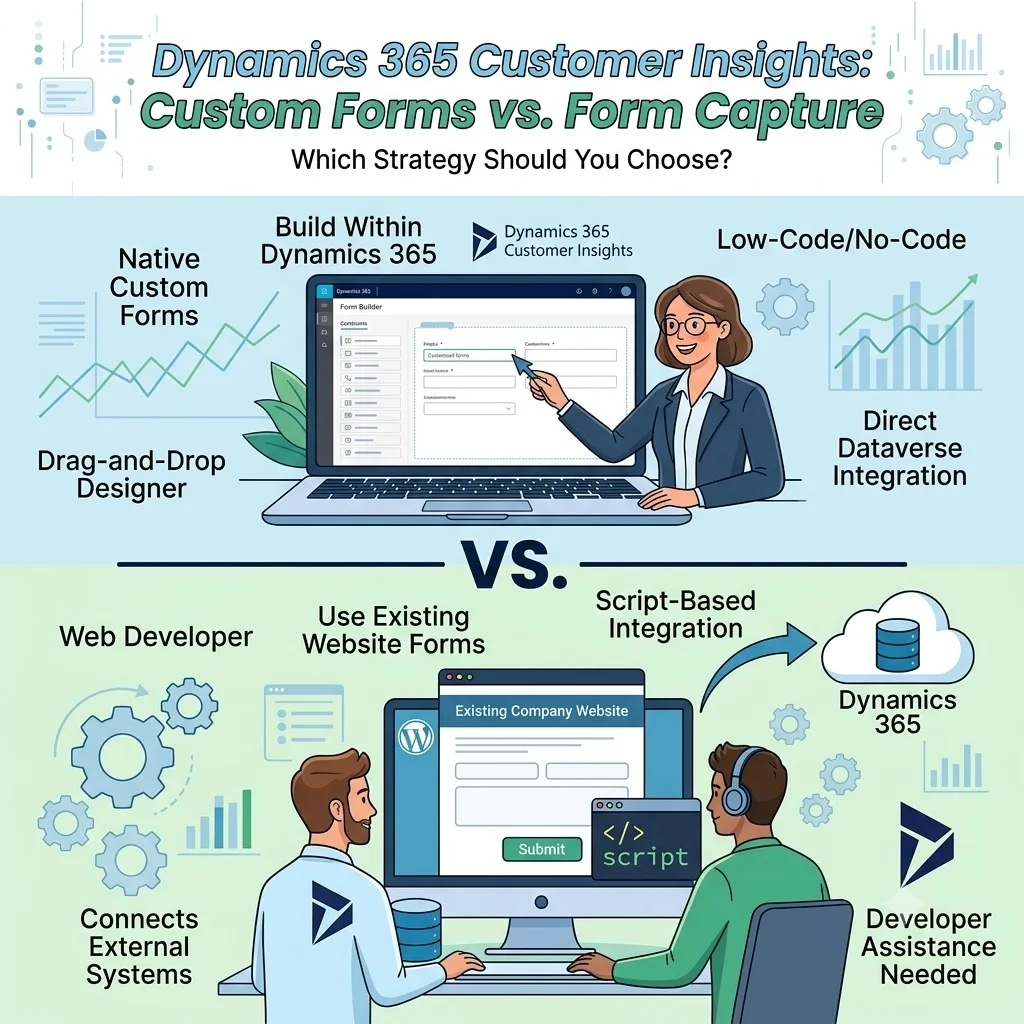
Native Custom Forms are built, designed, and managed entirely within the Dynamics 365 Customer Insights – Journeys application. Utilizing an intuitive, drag-and-drop visual designer, marketing professionals can create robust forms without needing to write a single line of HTML or CSS.
Core Features of Native Forms
Native forms are designed to give marketing teams total autonomy. Recent updates to the Customer Insights platform have made these forms incredibly powerful. For instance, marketers can now decide whether a custom field should permanently update a Dataverse record or if it should remain local to the form submission for campaign-specific, ad-hoc data collection.
Furthermore, Native Forms come with sophisticated publishing options. They can be embedded directly onto external webpages via a JavaScript snippet, hosted as standalone pages by Microsoft, or integrated flawlessly into Microsoft Power Pages.
Advantages of Native Custom Forms
-
Unparalleled Marketing Autonomy: The primary benefit of Native Forms is that they empower the marketing department. Marketers can design, edit, publish, and unpublish forms without submitting support tickets to web developers or IT.
-
Seamless Dataverse Integration: Because the architecture is unified, data mapping is virtually nonexistent. What you see on the form is exactly what populates in your CRM.
-
Advanced Analytics and Tracking: Native forms provide rich, granular insights. Marketers can track form visits, abandonment rates, submission times, and interaction histories natively within the Customer Insights dashboard.
Microsoft Dynamics 365 and Power Platforms Blog -
Native Consent Management: With strict regulations like GDPR and CCPA, consent is non-negotiable. Native forms inherently integrate with Dynamics 365’s consent tracking mechanisms, ensuring double opt-ins and purpose-based consent are logged accurately and legally.
-
Dynamic Content and Event Integration: If you are running an event registration, Native Forms can dynamically pull in session details, speaker lists, and event schedules, something external forms struggle to replicate without heavy custom coding.
Microsoft Learn
Limitations of Native Custom Forms
While highly powerful, Native Forms aren’t a silver bullet. If your organization has spent years developing highly customized, complex, multi-step logic on a proprietary web platform, rebuilding those from scratch inside Dynamics 365 can be a daunting, resource-intensive task. Furthermore, organizations lacking internal CRM expertise often need to collaborate with a reputable Microsoft dynamics 365 partner in Austin USA to ensure the initial setup, brand templates, and Dataverse architecture are configured correctly before handing the reins over to the marketing team.
Exploring Form Capture in Dynamics 365 Customer Insights
What happens if you already have beautifully designed, highly functional forms built into your WordPress, Sitecore, or Drupal website? What if these existing forms have complex conditional logic, or push data to multiple legacy systems simultaneously? This is where Form Capture comes into play.
Form Capture allows organizations to keep their existing third-party web forms exactly as they are. Instead of rebuilding the form inside Dynamics 365, you generate a tracking and capture script within Customer Insights and embed it onto the webpage hosting your external form.
How Form Capture Works
The Form Capture script acts as an invisible bridge. When a user clicks “Submit” on your WordPress form, the script intercepts the data payload, maps the external fields to your defined Dataverse attributes, and securely funnels the data into Dynamics 365 as a Lead or Contact.
Advantages of Form Capture
-
Preservation of Existing Infrastructure: If your company has invested heavily in a CMS ecosystem, Form Capture prevents you from having to tear down and rebuild functional web assets.
-
Handling Complex External Logic: Third-party forms often utilize advanced conditional formatting, calculator integrations, or multi-page progressive profiling that might surpass the out-of-the-box capabilities of the Dynamics 365 form designer. Form Capture lets you keep that logic intact.
-
Multi-System Routing: In enterprise environments, a single form submission might need to alert a legacy ERP, a custom database, and Dynamics 365 simultaneously. Form capture easily facilitates this multi-directional data routing.
Limitations of Form Capture
-
High IT Dependency: Form capture is inherently technical. It requires developer assistance to inject scripts, map HTML tags, and troubleshoot mapping failures. Any time the marketing team wants to add a new field to the external form, the IT team must update the code and remap the script in Dynamics 365.
-
Analytics Blind Spots: Form Capture cannot natively track page visits or form abandonment with the same granularity as Native Forms. It only registers the event once the submission payload is actively fired.
-
Consent Management Complexity: Passing legal consent flags from a third-party application into Dynamics 365 requires meticulous configuration to ensure that compliance records are legally binding and accurately time-stamped.
-
Maintenance Overhead: External website updates, CMS theme changes, or plugin updates can sometimes break the capture script, leading to silent data loss if monitoring isn’t strictly enforced.
Head-to-Head Comparison: Which Should You Use?
To make an informed architectural decision, marketing and IT leaders must evaluate how both methods perform across several critical business dimensions.
| Feature / Capability | Native Custom Forms | Form Capture
|
|---|---|---|
| Ownership & Autonomy | Marketing-led. High autonomy. | IT/Web Developer-led. High dependency. |
| Time to Market | Fast (Hours to build and deploy). | Slower (Days to configure, map, and test). |
| Maintenance Overhead | Low. Changes sync automatically. | High. External changes break mapping scripts. |
| Dataverse Integration | Direct, native, and error-free. | Requires strict field mapping and validation. |
| Consent & Compliance | Fully native, built-in tracking. | Requires complex custom field mapping. |
| Analytics Tracking | Full funnel (views, abandonment). | Limited (submission events only). |
| Ideal Use Case | New campaigns, event registrations, fast landing pages. | Legacy CMS integrations, complex logic forms. |
1. Implementation and Agility
Marketing agility is critical. If a new product launches, the marketing team needs a landing page and a capture form immediately. Native Forms win this category outright. With drag-and-drop functionality, a marketer can have a live, CRM-connected form up in minutes. Conversely, Form Capture involves a multi-step process: the web team builds the form, the CRM admin builds the mapping shell in Dynamics, the developer places the script, and the QA team tests the payload.
2. Technical Maintenance
Technical debt is a major concern for growing enterprises. With Native Forms, the maintenance is virtually zero. If you add a “Company Size” field to the form, it automatically maps to the “Company Size” column in Dataverse. With Form Capture, if a web developer inadvertently changes the HTML ID of the “Company Size” field on the WordPress site, the Form Capture script will fail to recognize it, resulting in data loss until the broken mapping is identified and repaired.
Organizations that rely heavily on document management and intranet portals often consult with a SharePoint consulting company to manage internal data routing. Adding brittle form capture scripts into complex, legacy web environments without proper governance can create frustrating silos that stymie marketing efforts.
3. Data Quality and Consent
Customer Insights – Journeys excels at maintaining a clean database. Native forms utilize platform-wide validation rules, ensuring emails are formatted correctly and duplicates are caught before they clutter the system. Native forms also inherently understand purpose-based consent, making GDPR compliance straightforward.
Technical Considerations and Architecture
For organizations that must use Form Capture, understanding the technical architecture is paramount. The form capture feature is disabled by default in Customer Insights and must be enabled via the Settings > Feature Switches menu. Furthermore, your DynamicsMKT_Forms solution version must be updated to version 1.1.35355 or higher to support real-time capture capabilities.
When executing Form Capture, you are relying heavily on JavaScript. Modern browsers with strict privacy blockers or ad-blockers can sometimes interfere with tracking scripts. Therefore, relying solely on client-side script capture carries a marginal inherent risk of data loss.
To mitigate this, many enterprises turn to middleware. This is where engaging Microsoft power platform consulting services becomes invaluable. Rather than relying solely on front-end Form Capture scripts, expert consultants can help you leverage Power Automate. By utilizing Power Automate, you can capture form submissions via secure backend APIs, cleanse the data, run custom validation workflows, and then securely inject the data into Dataverse. This approach is vastly more robust than client-side script mapping, ensuring data integrity even in the most complex IT environments.
Designing a Future-Proof Data Collection Strategy: The Hybrid Approach
In reality, very few enterprise organizations will rely entirely on one method. Business is rarely that simple. The most successful deployments utilize a hybrid strategy, leveraging the strengths of both Native Forms and Form Capture during different phases of their digital transformation.
The Phased Migration Strategy
If you are transitioning to Dynamics 365 Customer Insights from a legacy CRM (like Salesforce, HubSpot, or Marketo), you cannot afford to halt your lead generation while you rebuild your website.
-
Phase 1 (Immediate Integration): Utilize Form Capture to immediately hook your existing web properties into Dynamics 365. This ensures that while the technical implementation is happening in the background, your sales team continues to receive fresh leads without disruption.
-
Phase 2 (New Campaign Rollout): Mandate that any new marketing campaigns, event registrations, or landing pages must be built using Native Custom Forms. This slowly reduces your reliance on external systems and familiarizes the marketing team with the native tools.
-
Phase 3 (Long-Term Standardization): Progressively replace high-traffic legacy forms with Native Forms embedded via JavaScript, or migrate the landing pages to Microsoft Power Pages for ultimate native synergy.
Executing a phased migration requires meticulous planning. Companies that try to manage this transition without a roadmap often end up with duplicate records and broken marketing journeys. Procuring comprehensive Power platform CoE ensures that your Dataverse architecture, Power Automate flows, and Customer Insights forms are all communicating harmoniously during the transition period.
Best Practices for Form Implementation in D365
Regardless of whether you choose Native Forms, Form Capture, or a hybrid approach, adhering to best practices will maximize your return on investment and keep your database pristine.
-
Standardize Field Naming Conventions: Before building any forms, agree on a strict naming convention for your custom fields. A messy Dataverse is difficult to clean. If you use Form Capture, ensure the HTML
nameattributes on your external forms perfectly mirror your Dataverse schema. -
Leverage Local Custom Fields Strategically: In Native Forms, utilize the feature that allows custom fields to save locally to the form submission rather than permanently to the Dataverse record. Ask yourself: “Do I need to know this customer’s dietary requirement forever, or just for this specific event?” If it’s the latter, do not clutter the Contact record; save it locally.
Microsoft Dynamics 365 and Power Platforms Blog -
Implement Robust Testing Protocols: Form mapping can be delicate. Establish a QA protocol where every form is submitted with edge-case data (excessively long names, special characters in emails) to ensure the data passes successfully into Customer Insights without triggering API limits or validation errors.
-
Monitor Analytics Vigilantly: If using Form Capture, you will miss out on native abandonment analytics. Compensate for this by ensuring your Google Analytics 4 (GA4) or other web tracking tools are configured to monitor the form’s front-end performance, giving your marketing team the visibility they need to optimize conversion rates.
-
Align Marketing and IT: The biggest failure point in Form Capture is a lack of communication. If the marketing team asks the web developer to change a form layout, the developer might accidentally alter an HTML tag that breaks the Dynamics 365 mapping script. Create a strict change-management protocol between departments.
Conclusion
Dynamics 365 Customer Insights – Journeys provides marketers with incredibly flexible, powerful tools to capture customer intent. The choice between Native Custom Forms and Form Capture ultimately boils down to your organization’s current infrastructure, internal capabilities, and long-term digital strategy.
However, if your digital ecosystem relies on complex, legacy web infrastructure that cannot be easily replaced, Form Capture provides a vital lifeline, allowing you to bridge the gap between your external CMS and your Microsoft CRM.
By understanding the technical boundaries of each approach—and strategically deploying a hybrid model powered by tools like Power Automate when necessary—your organization can build a frictionless, highly scalable data collection engine that fuels your real-time marketing journeys for years to come.