










Introduction
The modern enterprise operates in a fast-moving digital ecosystem where efficiency, connectivity, and visibility are no longer optional, Because they are foundational. As organizations increasingly rely on digital tools to manage content, collaborate across teams, and deliver seamless customer experiences, the importance of a well-integrated platform becomes clear. At the center of this transformation sits SharePoint, a cornerstone of the Microsoft ecosystem that continues to evolve alongside enterprise needs.
In parallel, search engine optimization (SEO) and content strategy have also undergone a dramatic shift. Businesses are no longer simply publishing content; they are building interconnected digital environments where data, workflows, and insights flow freely. This is where SharePoint integrations become critical. By connecting SharePoint with other enterprise tools, organizations can unlock automation, enhance collaboration, and centralize data in ways that drive measurable outcomes.
For both small and medium-sized enterprises (SMEs) and large organizations, SharePoint Development has emerged as a strategic advantage. It enables businesses to tailor their digital workplaces, streamline operations, and remain competitive in an increasingly complex landscape. Whether it’s integrating with Microsoft 365, leveraging automation tools, or connecting third-party platforms, SharePoint is no longer just a document management system—it is the backbone of enterprise collaboration.
Section 1: Understanding SharePoint Integrations
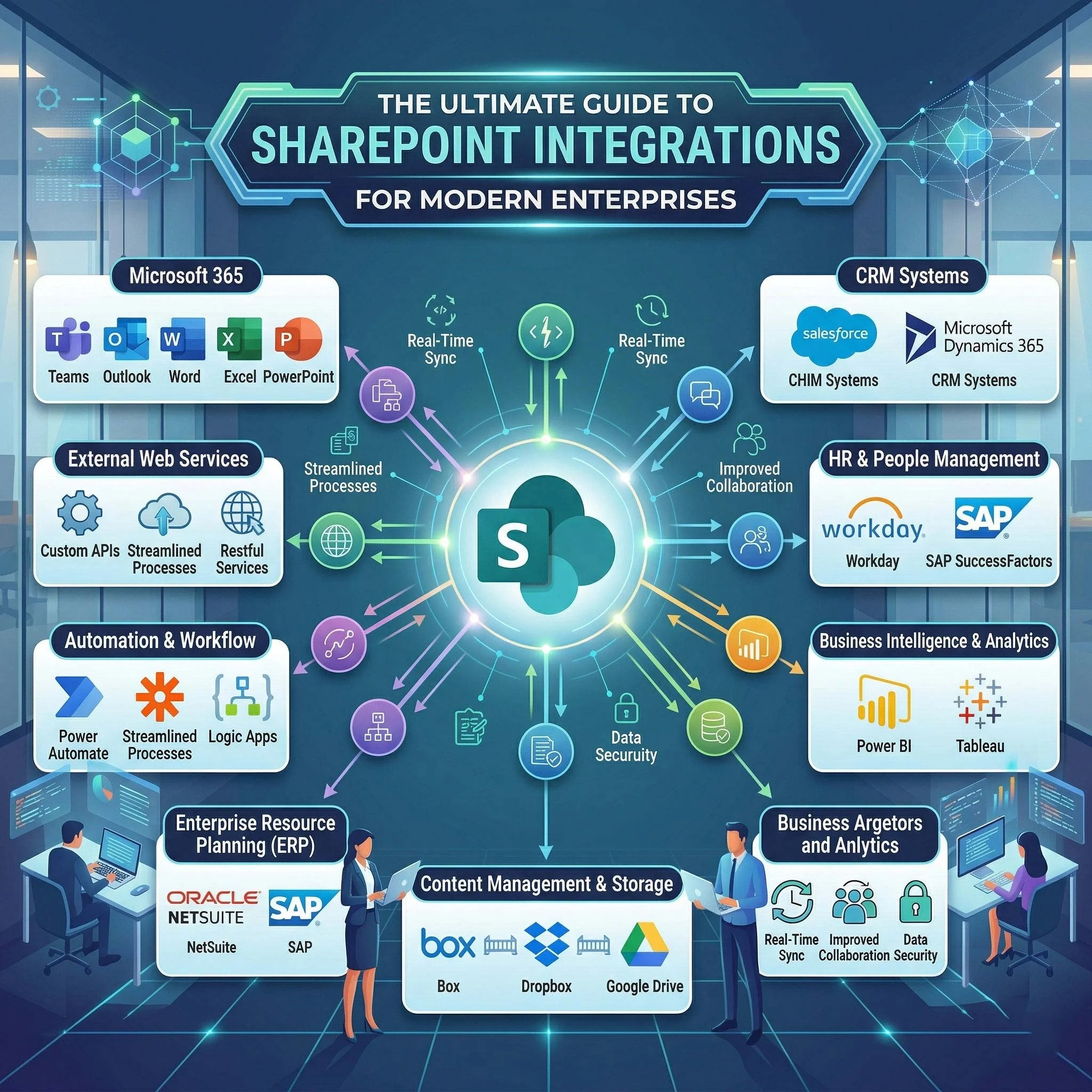
At its core, SharePoint integration refers to the process of connecting SharePoint with other applications, services, and systems to create a unified and efficient digital environment. These integrations can be broadly categorized into native integrations (within the Microsoft ecosystem) and third-party integrations (external tools and platforms).
Native integrations include connections with tools like Microsoft Teams, Outlook, OneDrive, and Dynamics 365. These are designed to work seamlessly together, offering a cohesive user experience. On the other hand, third-party integrations involve platforms such as Salesforce, SAP, or custom-built enterprise solutions, enabling organizations to extend SharePoint’s capabilities beyond its default features.
The benefits of SharePoint integration are substantial. First, it enables automation, reducing manual tasks and minimizing errors. Second, it centralizes data, ensuring that information is accessible and consistent across departments. Third, it optimizes workflows by connecting systems that previously operated in silos.
Consider a real-world example: a company integrates SharePoint with its CRM system. Sales teams can access customer documents directly from SharePoint, while updates in the CRM automatically reflect in shared dashboards. This eliminates duplication and enhances productivity.
Organizations looking to implement such solutions often rely on Microsoft SharePoint Integration Services and Microsoft Azure Integration Services, which provide the infrastructure and tools needed to build scalable and secure integrations.
Ultimately, adopting enterprise SharePoint solutions is not just about technology—it’s about enabling smarter, faster, and more connected ways of working.
Section 2: Latest Trends in SharePoint Development
The landscape of modern SharePoint Development is constantly evolving, driven by emerging technologies and changing business demands. One of the most significant trends is the integration of artificial intelligence (AI) and automation. AI-powered tools can analyze documents, automate content tagging, and even provide predictive insights, transforming how organizations manage information.
Another major trend is the shift toward cloud-first and hybrid environments. With SharePoint Online as part of Microsoft 365, businesses can access their data from anywhere while maintaining the flexibility to integrate with on-premises systems. This hybrid approach is particularly valuable for enterprises with legacy infrastructure.
The growing integration with the Microsoft 365 ecosystem is also reshaping SharePoint’s role. Tools like Teams, Power Platform, and Viva are deeply interconnected with SharePoint, creating a unified digital workplace where communication, collaboration, and data management coexist seamlessly.
Additionally, the rise of low-code and no-code solutions is democratizing SharePoint Development. Platforms like Power Apps and Power Automate allow non-developers to build custom workflows and applications, reducing dependency on IT teams and accelerating innovation.
These SharePoint trends highlight a broader shift toward agility, scalability, and user empowerment. Organizations that embrace these advancements are better positioned to adapt to future challenges and opportunities.
Section 3: Keyword Research Advancements for SharePoint Content
As SharePoint continues to play a central role in enterprise environments, creating optimized content around it has become increasingly important. Modern SEO is no longer about stuffing keywords into content; it’s about understanding search intent and delivering value-driven information.
AI-driven keyword research tools now enable marketers to identify patterns, predict trends, and uncover opportunities that were previously difficult to detect. For example, instead of targeting generic terms like “SharePoint,” businesses can focus on long-tail keywords such as “SharePoint integration tools for enterprises” or “SharePoint Development strategies for SMEs.”
Another key advancement is semantic SEO, which emphasizes context and relationships between topics. By creating content clusters around SharePoint—covering integrations, development, automation, and security—organizations can improve their visibility and authority in search results.
For businesses targeting enterprise audiences, SEO for SharePoint Development requires a strategic approach. This includes aligning content with user intent, optimizing for technical queries, and providing actionable insights that resonate with decision-makers.
Incorporating a strong keyword strategy ensures that SharePoint-related content not only reaches the right audience but also drives meaningful engagement and conversions.
Section 4: Integration in SharePoint – Tools & Technologies
The success of SharePoint integrations largely depends on the tools and technologies used to implement them. Among the most important are REST APIs and Microsoft Graph, which enable developers to interact with SharePoint data programmatically. These APIs allow for custom integrations, automation, and advanced data manipulation.
Another critical component is Azure Logic Apps and Power Automate, which facilitate workflow automation. These tools enable organizations to create triggers and actions that connect SharePoint with other systems, reducing manual intervention and improving efficiency.
Third-party connectors and middleware solutions also play a vital role. They act as bridges between SharePoint and external platforms, ensuring seamless data exchange and compatibility.
Security and compliance are equally important considerations. As organizations integrate multiple systems, they must ensure that data remains secure and compliant with industry regulations. Tools like Microsoft Intune, often implemented with the help of a Microsoft Intune Consultant, help manage device security and enforce policies across integrated environments.
By leveraging these SharePoint integration tools, businesses can build robust, scalable, and secure solutions that align with their operational needs.
Section 5: Optimizing for Voice Search and Mobile Devices
In today’s mobile-first world, optimizing SharePoint environments for accessibility and usability is essential. Employees increasingly rely on mobile devices to access information, collaborate, and complete tasks. This makes mobile SharePoint optimization a top priority.
Responsive design ensures that SharePoint sites adapt to different screen sizes, providing a consistent user experience across devices. Performance optimization, such as reducing load times and minimizing resource usage, further enhances usability.
Voice search is another emerging trend. As more users interact with digital systems through voice commands, optimizing content for voice search SEO becomes important. This involves using natural language, answering specific questions, and structuring content in a way that aligns with conversational queries.
Accessibility is also a key consideration. Ensuring that SharePoint sites are inclusive and compliant with accessibility standards not only improves usability but also reflects a commitment to diversity and inclusion.
By focusing on responsive SharePoint design and modern optimization techniques, organizations can create digital workplaces that are both efficient and user-friendly.
Section 6: Building Quality Backlinks for SharePoint Content
In the competitive world of digital marketing, building authority is essential. One of the most effective ways to achieve this is through backlink building. For SharePoint-related content, this involves creating high-quality, informative resources that other websites and communities want to reference.
Guest posting on technology blogs, participating in Microsoft communities, and collaborating with industry partners are all effective strategies. Publishing case studies and whitepapers that showcase real-world applications of SharePoint integrations can also attract valuable backlinks.
Content marketing plays a crucial role in this process. By consistently producing insightful and relevant content, organizations can establish themselves as thought leaders in the SharePoint space.
A strong SharePoint SEO strategy combines technical optimization with authority-building efforts, ensuring long-term visibility and credibility.
Section 7: Effective SharePoint and Power Platform Integrations
The integration of SharePoint with the Power Platform has opened up new possibilities for business process optimization. Tools like Power Apps, Power Automate, and Power BI enhance SharePoint’s capabilities, enabling organizations to create customized solutions tailored to their needs.
Power Apps allows businesses to build custom applications without extensive coding, making it easier to address specific challenges. Power Automate streamlines workflows by automating repetitive tasks, while Power BI provides advanced data visualization and analytics.
These integrations enable seamless data flow between systems, improving decision-making and operational efficiency. Organizations often turn to Power Platform Consultancy services to design and implement these solutions effectively.
By leveraging Power Platform integration, businesses can transform SharePoint into a powerful hub for innovation and productivity.
Section 8: Importance of SharePoint in SMEs
While SharePoint is often associated with large enterprises, it is equally valuable for small and medium-sized businesses. In fact, SharePoint for SMEs offers a cost-effective way to implement advanced collaboration and document management solutions.
One of the key advantages is scalability. SMEs can start with basic features and gradually expand their SharePoint environment as their needs grow. This flexibility ensures that businesses can adapt without significant upfront investment.
SharePoint also supports compliance and document management, helping SMEs maintain organized and secure records. This is particularly important in industries with strict regulatory requirements.
Moreover, adopting SharePoint enables SMEs to compete with larger organizations by leveraging the same tools and technologies. It supports digital transformation, allowing businesses to streamline operations and improve efficiency.
Conclusion
SharePoint has evolved into a powerful platform that goes far beyond document management. Through strategic integrations, it enables organizations to create connected, efficient, and future-ready digital workplaces.
From understanding the fundamentals of SharePoint integrations to exploring advanced tools and trends, businesses must adopt a proactive approach to SharePoint Development. Whether it’s leveraging AI, optimizing for SEO, or integrating with the Power Platform, the opportunities are vast.
The future of SharePoint lies in its ability to adapt and integrate with emerging technologies. Organizations that invest in modern Microsoft integration strategies will be better equipped to navigate the challenges of a rapidly changing digital landscape.
Now is the time to take action. Explore the potential of SharePoint, invest in advanced integration strategies, and embrace the innovations within the Microsoft ecosystem to future-proof your business.