










In 2026, retail technology is evolving faster than ever, driven by the need for seamless customer experiences, real-time business intelligence, and agile operations. At the core of this transformation are POS systems for retail stores — the digital interfaces where sales, data, inventory, and customer engagement converge. While traditional POS solutions have long served as transaction tools, the next generation of retail systems is smarter, more adaptable, and more deeply integrated with cloud and AI technologies than anything before.
One platform that’s helping retailers adopt and extend this new era of smart POS and connected retail operations is Microsoft Power Apps. As part of the broader Microsoft Power Platform, Power Apps lets businesses build custom applications — including modern POS and retail management tools — using low-code development. These applications streamline processes, integrate with other business systems, and deliver real-time insights without the complexity and cost of traditional software development.
In this in‑depth blog, we’ll explore how Microsoft Power Apps is reshaping retail technology in 2026, why retail businesses are adopting it for next‑generation POS and operational workflows, and what this means for retailers of all sizes — from flagship stores to pop‑ups and everything in between.
Introduction: The Rise of Smart Retail Technology in 2026
The retail landscape has changed dramatically over the last decade. Customers expect personalized experiences whether shopping online or in store, and businesses must manage inventory, fulfillment, analytics, payments, and customer data seamlessly across channels. This has pushed POS systems far beyond the simple role of processing transactions.
Modern retailers now demand platforms that can:
- Deliver real‑time insights on sales and inventory
- Support mobile and omnichannel checkout experiences
- Enable personalized customer engagement
- Integrate easily with ERP, CRM, and analytics systems
In 2026, technologies like edge computing, AI‑driven recommendations, and scalable cloud services are transforming how retail operations function, making traditional systems seem antiquated. To compete in this landscape, retailers are turning to platforms that empower customization and rapid innovation. That’s where Power Apps plays a major role.
What Makes Power Apps Ideal for Retail Modernization?
Microsoft Power Apps is a low‑code app development platform that enables businesses to design, build, and deploy custom applications quickly and efficiently. Whether it’s a tailored inventory dashboard, staff task app, or even a fully customized POS interface, Power Apps lets developers — and increasingly non‑technical business users — create solutions that match their exact operational needs.
Here’s why retailers are gravitating toward Power Apps:
🚀 1. Low‑Code, High Impact Development
Power Apps dramatically reduces the time and cost of building custom retail applications. In industries where requirements shift rapidly — such as during seasonal sales or promotional campaigns — being able to create or modify apps in weeks instead of months is a game changer.
🔄 2. Deep Integration with Retail Technology
Power Apps connects seamlessly with data sources like Microsoft Dataverse, Dynamics 365, Azure services, and more. For POS systems, this means transactions, inventory, customer rewards, and analytics can be unified in one ecosystem.
This integration allows retailers to synchronize data between online sales channels, physical stores, and back‑office systems — creating a coherent picture of business performance.
🛠️ 3. Customization Without Compromise
Traditional POS solutions often come with rigid structures. With Power Apps, retailers can tailor every screen, workflow, and data interaction to reflect store processes, employee roles, and customer experience goals.
📈 4. AI and Data‑Driven Insights
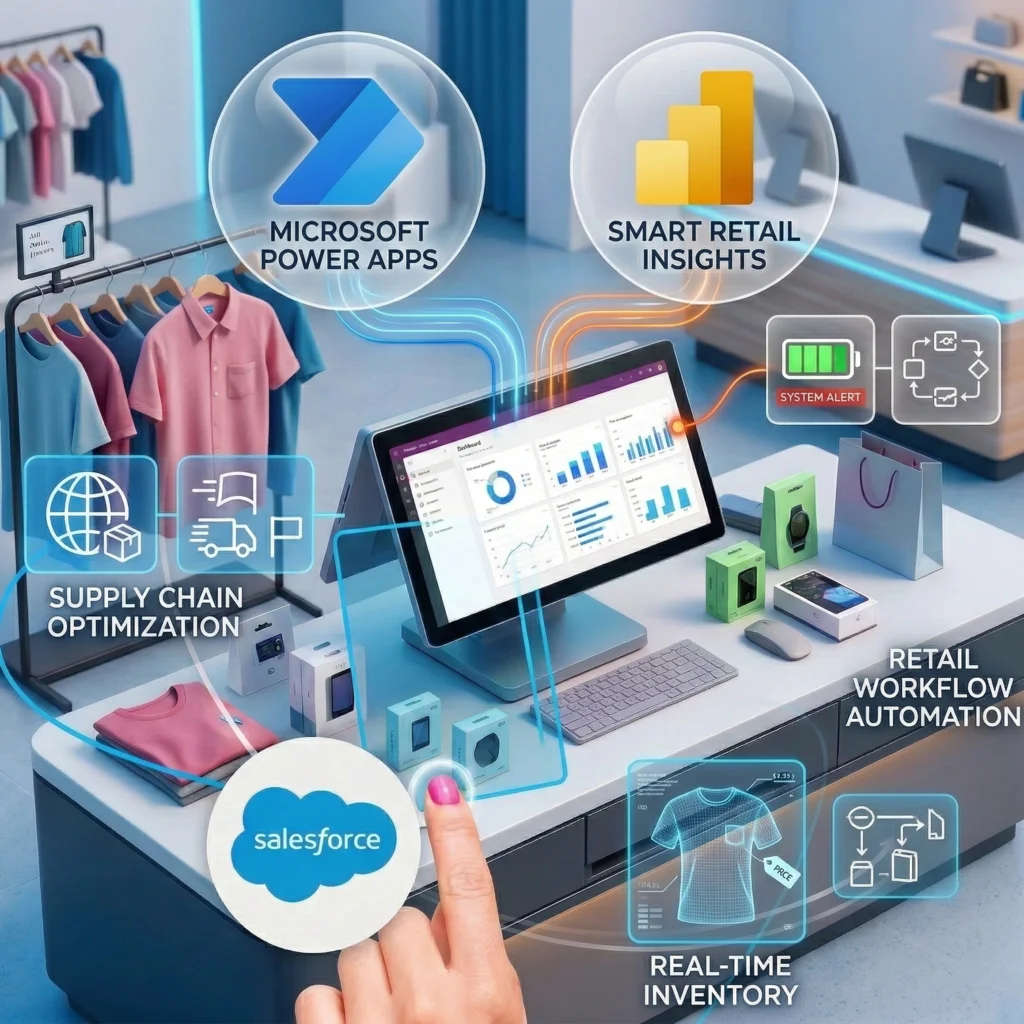
By combining Power Apps with analytics tools like Power BI, retailers can surface real‑time dashboards showing sales performance, inventory alerts, customer behavior trends, and more. These actionable insights empower staff and managers to make informed decisions on the fly.
Real‑World Scenarios: Power Apps and POS Transformation
Let’s look at how Power Apps is reinventing smart retail by bringing flexibility to traditional POS roles.
📍 1. Custom POS Interfaces for Specialized Retail
Large retailers often require unique checkout flows — such as appointment check‑ins, product rentals, or in‑store services — that standard POS software doesn’t natively support. Using Power Apps, IT teams or external developers can build interfaces that handle these specialized workflows without paying for expensive custom software.
Example: A boutique retailer integrates custom loyalty program screens right into checkout workflows created in Power Apps, allowing staff to offer personalized promotions based on customer history.
📦 2. Unified Inventory and POS Management
Inventory tracking remains a critical challenge for retailers of all sizes. A Power Apps‑based POS solution can sync inventory changes in real time across locations and channels. This eliminates discrepancies between eCommerce platforms and brick‑and‑mortar stores.
📲 3. Mobile POS for Pop‑Ups and Events
Retail isn’t always limited to storefronts. Pop‑up shops, trade shows, and event sell‑outs require flexible systems that move with the business. A mobile Power Apps POS can run on tablets or phones, offering full checkout capabilities without fixed hardware.
This agility empowers smaller retailers and niche brands to expand their reach with minimal infrastructure investment.
📊 4. Personalized Staff Dashboards
Retail operations involve more than sales checkouts. Staff need task lists, training checklists, customer appointment schedules, and more. Power Apps can combine all of these into intuitive dashboards accessed right from the POS interface.
📈 5. Real‑Time Analytics and Alerts
By integrating Power Apps with Microsoft’s analytics stack, smart retail systems can:
- Alert managers when inventory is low
- Identify trending products
- Track checkout bottlenecks
- Deliver insights into customer purchase behavior
Businesses can then act on these insights quickly, keeping operations smooth and responsive.
Benefits of Power Apps‑Driven Retail POS Systems
Retailers adopting Power Apps are seeing tangible benefits across multiple areas:
🛍️ Efficiency Gains
By automating manual tasks — like inventory reconciliation or manual reporting — staff can focus on customer engagement and strategic tasks.
💰 Cost Savings
Low‑code development lowers dependence on expensive custom software builds while reducing maintenance overhead.
📦 Scalability
Whether a retailer has one location or a global footprint, Power Apps scales with business needs, making it ideal for both franchise networks and independent stores.
👩💼 Enhanced Customer Experiences
Smart POS interfaces contribute to quicker checkouts, accurate inventory insights, and personalized offers — all of which enhance customer satisfaction.
Microsoft Power Apps in the Broader Retail Tech Ecosystem
Power Apps doesn’t function in isolation. It’s part of the larger Microsoft ecosystem that includes ERP, CRM, analytics, and automation tools. For instance, retailers building POS enhancements on Power Apps can integrate with systems implemented by experienced microsoft dynamics 365 partner in Austin USA to unify commerce with finance, supply chain, and customer engagement platforms.
Likewise, organizations seeking tailored solutions often work with a microsoft power apps solution partner to accelerate their builds and ensure best practices in design, performance, and governance.
Meanwhile, retailers embracing digital transformation may invest in cloud application development services to maximize flexibility, portability, and global access to their POS innovations.
Challenges and Considerations for Retailers
While Power Apps opens up remarkable opportunities, retailers should be mindful of:
⚙️ Data Governance
Handling customer data, payment information, and inventory records requires strict governance practices — including compliance with PCI and privacy standards.
🧠 Training Needs
Store teams may require training to adopt new custom interfaces, especially if they differ from standard retail POS systems.
🔄 Third‑Party Integrations
Connecting Power Apps with legacy systems or niche hardware can require technical planning and expertise.
Future Outlook: Retail POS Beyond 2026
As AI becomes more sophisticated, we’re likely to see features such as predictive sales recommendations, voice‑activated sale inputs, and fully autonomous checkout experiences integrated into POS workflows. Retailers who build on platforms like Microsoft Power Apps will have an edge — designing and iterating smart POS solutions that keep pace with customer expectations and market dynamics.
The traditional POS role is no longer just about ringing up purchases — it’s a strategic hub that informs everything from staffing and inventory to loyalty and fulfillment.
Conclusion: Power Apps as a Catalyst for Retail Innovation
In 2026, smart retail is defined by flexibility, integration, and intelligence. Microsoft Power Apps enables retailers to build custom POS systems that are tailored, adaptive, and fully integrated into the broader business ecosystem. From unified commerce experiences to agile mobile checkout solutions, Power Apps is helping retailers reinvent how they operate, delight customers, and compete in a digital world.
With the combination of low‑code agility, deep Microsoft ecosystem integrations, and the ability to tailor experiences to business needs, Power Apps is a standout choice for businesses looking to lead rather than follow in the smart retail revolution.